Practicing GitOps: An ArgoCD and GitLab CI/CD Tutorial
Background
This article aims to introduce a viable implementation of GitOps through a practical case study based on GitLab and ArgoCD.
This setup is ideal for teams looking for a lightweight, rapid container deployment workflow. If you are seeking a fast and simple deployment method for projects running in Kubernetes (K8s), GitOps is an excellent choice.
Typically, our source code is managed by version control systems (VCS) like GitLab. In recent years, as GitLab’s built-in CI has become increasingly robust and user-friendly, GitOps has become much easier to adopt.
Core Concepts
Core Components
- CI (Continuous Integration): Implemented via GitLab pipelines.
- CD (Continuous Delivery): Implemented via ArgoCD.
- Artifact: Often referred to as the build artifact (e.g., Docker image), which acts as the glue linking the independent CI and CD phases together.
*Note: In this article, CI and CD are used in a narrow sense, representing “build” and “deploy” respectively.*
CI (Continuous Integration)
The Core: In GitLab, we use a .gitlab-ci.yml file to define our CI Pipeline. Beyond routine code linting and unit testing, its primary responsibility is compiling the project and packaging it. While it is technically possible to perform deployments directly inside the GitLab CI pipeline, we will discuss later why this is generally not recommended.
CD (Continuous Delivery)
This phase consists of two main pillars:
- The Artifact: The compiled output of the project, most commonly a binary, package, or container image.
- Deployment Instructions: Guidelines on how the artifact should be deployed—for instance, which directories it resides in, and how to start the service. Because deployment instructions can get highly complex (involving sequential steps, health checks, etc.), it is usually delegated to a dedicated system. Unless your deployment is extremely trivial, using GitLab CI to handle the entire deployment execution is not ideal. However, GitLab CI is excellent for triggering the deployment.
Architecture & Workflow
The diagram below illustrates the complete end-to-end workflow of this case study:
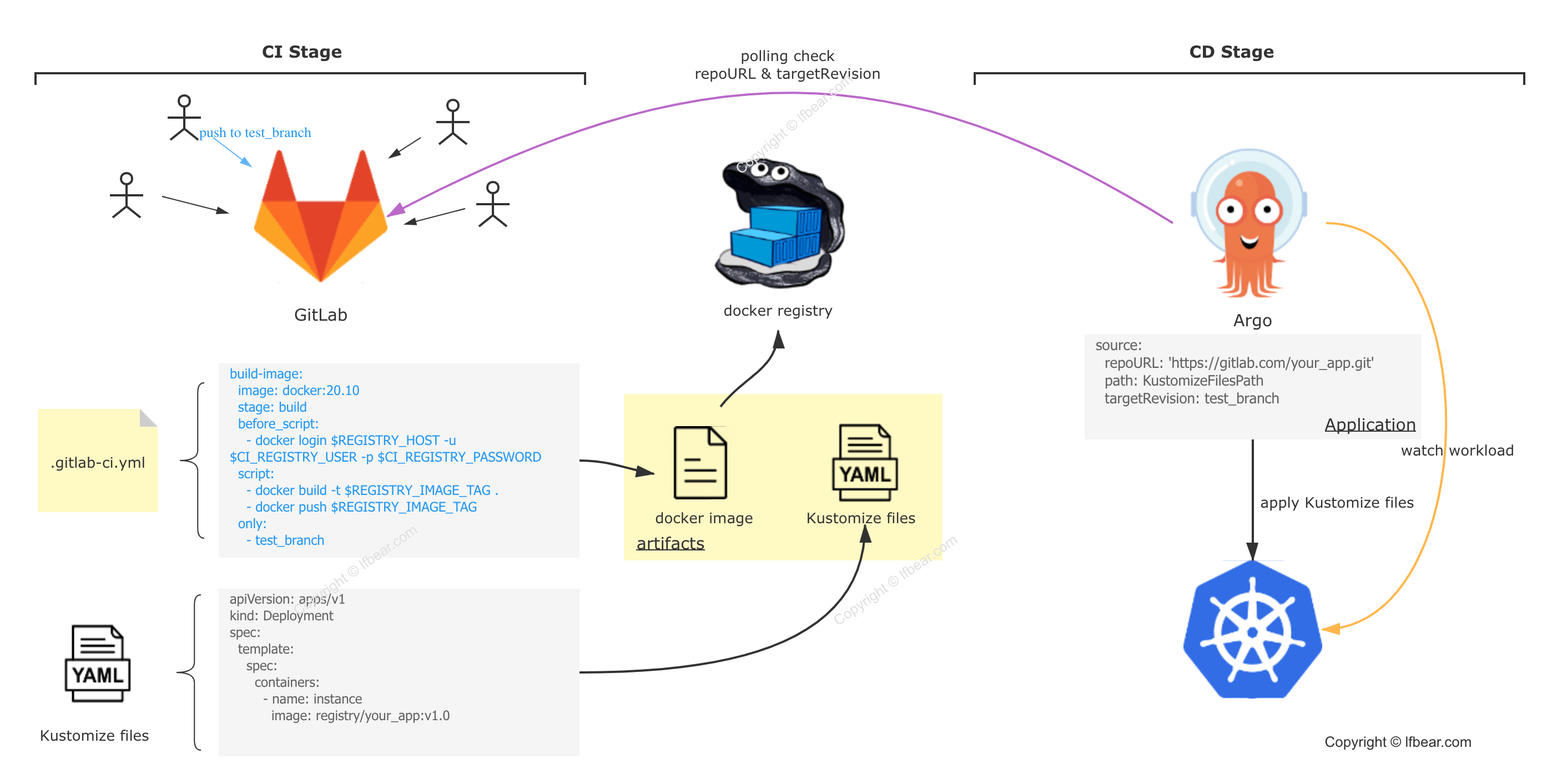
CI Phase — Deliverable: Docker Image
*A quick note: Because GitLab undergoes rapid version iterations and major changes, if you are unsure of your current GitLab version, please refer to the documentation in your local GitLab help page rather than the online official docs.*
User Story
Developers commit code to Project A based on their respective feature requirements. Pushing to a specific branch (in this example, test_branch) automatically triggers the pipeline stages defined in .gitlab-ci.yml (specifically, build-image). The runner executes the scripts declared in this stage, building a Docker image using the project’s Dockerfile and pushing the final image to a specified container registry.
.gitlab-ci.yml
The configuration for the image-building portion of our GitLab CI is as follows:
variablesandstagesare global configurations (we won’t repeat them later).- In the
before_scripthook of thebuild-imagestage, we execute adocker login. The mainscriptblock handlesdocker buildanddocker pushto push the artifact to our container registry. - Trigger Conditions: The
onlyblock specifies that the pipeline only runs when changes are pushed totest_branch(multiple conditions under theonlyfield behave as an ‘OR’ relationship). Theexceptblock excludes triggers on specific commit titles (the first line of the commit message) and tags. We will explain shortly why we exclude specific commit messages.
1 | variables: |
For detailed syntax regarding GitLab CI, please refer to the official GitLab documentation.
GitLab Runner
A GitLab Runner is a mandatory component since it is the physical executor of the .gitlab-ci.yml pipeline. GitLab Runners can be installed in several different ways. Once installed, remember to tag and group them, which allows you to target specific runners for different pipeline stages in .gitlab-ci.yml.
CD Phase — Key Word: Kustomize
Kustomize
Before diving into ArgoCD, let’s introduce Kustomize, a native configuration management tool for Kubernetes. It is one of the most elegant options for managing K8s manifests.
Imagine this scenario: you have a single deployment that needs to be deployed to two different clusters. Typically, you might switch contexts to the first cluster and run kubectl apply, then switch to the second and run kubectl apply again. The complexity is relatively manageable.
But what if you’re told that these two clusters require different container images or different startup arguments? What do you do? Copy and paste the YAML manifest and manually edit the differences? That starts to get messy and error-prone. What if you have 10 or 100 such deployments?
Before you pull your hair out, take a look at Kustomize. When deploying to different environments, slight variations are inevitable (at the very least, deployment names or labels will differ). Kustomize is designed precisely to handle these overrides cleanly.
If you are unfamiliar with Kustomize, don’t worry. For now, you can simply think of it as the standard Kubernetes Deployment YAML manifests—essentially, the configuration files used to deploy your app.
ArgoCD
Now let’s introduce ArgoCD. At its core, ArgoCD is a tool that sits between your Git repository and your Kubernetes cluster. As shown in the workflow diagram, it monitors the Kustomize manifests on a specific branch of your GitLab repository on one end, and watches the actual resources running in Kubernetes on the other. It continuously compares the desired state in Git with the live state in K8s. If it detects a drift, it can trigger a synchronization to K8s, either automatically or manually.
You might ask: Why do we have to monitor Kustomize files stored in GitLab?
- If you use Kustomize manifests but don’t store them in Git, then you aren’t doing GitOps. While that is technically possible, it falls outside the scope of this tutorial. From my personal experience, keeping things simple by relying on Git as the single source of truth is highly elegant.
- If you are storing deployment configurations in GitLab, do they have to be Kustomize manifests? No, not at all. ArgoCD supports various configurations, including Helm charts, Ksonnet, Jsonnet, and raw directory layouts.
Section Summary
To sum up the CD portion: deployment requires configuration files (the Kustomize files mentioned above). By storing these configurations directly in Git and using a CD controller (ArgoCD) to continuously reconcile the differences between the desired Git configuration and the live K8s state, we manage deployments declaratively. This is the essence of GitOps.
One final detail: since the CD tool relies on configurations stored in Git, if your deployment manifests live in the same Git repository as your application source code, you will need to handle a specific edge case in your GitLab pipeline. When the CI stage builds a new image, it needs to commit and push the updated image tag back into the Kustomize files in Git. However, this push will trigger the CI pipeline all over again, causing an infinite loop.
To prevent this, we introduce the exclusion rule $CI_COMMIT_TITLE == "SkipCI" mentioned earlier (suitable for GitLab 10+. Modern versions of GitLab offer even more elegant ways to skip pipelines). Here is the corresponding pipeline configuration from my demo project:
1 | deploy-by-argo: |
./hack/deploy/test_branch/patch.yaml file content:
1 | apiVersion: apps/v1 |
This concludes our guide on practicing GitOps with ArgoCD. If you have any questions, feel free to leave a comment below!
Update (2021-10-15)
I’ve added a GitOps Demo repository: https://github.com/lfbear/gitops-demo.
This is a simplified version of the setup described above, perfect for getting a quick, hands-on experience with GitOps.