A Very Wicked Piece of Code: Part 3 (Happy Farm)
Following the previous two wicked code releases, this time we are looking at Xiaonei’s latest hit game: Happy Farm (开心农场). As always, a quick disclaimer first: this code is purely for educational and research purposes. Please do not deploy it on a server for browser users to exploit, otherwise you will be solely responsible for any consequences! Please respect the hard work of the game developers.
[2009-04-27] Happy Farm has released an urgent notice crack down on players using game bots. While this research was never intended to release a public cheat tool to satisfy players, the code does indeed function as a “bot”. To prevent this post from causing unnecessary legal disputes, I am closing the comment section and stopping updates to the code (the current version is already defunct). Thank you for your understanding. Tech-learning and discussions unrelated to “Happy Farm” will continue, so please check the contact info at the end of this post.
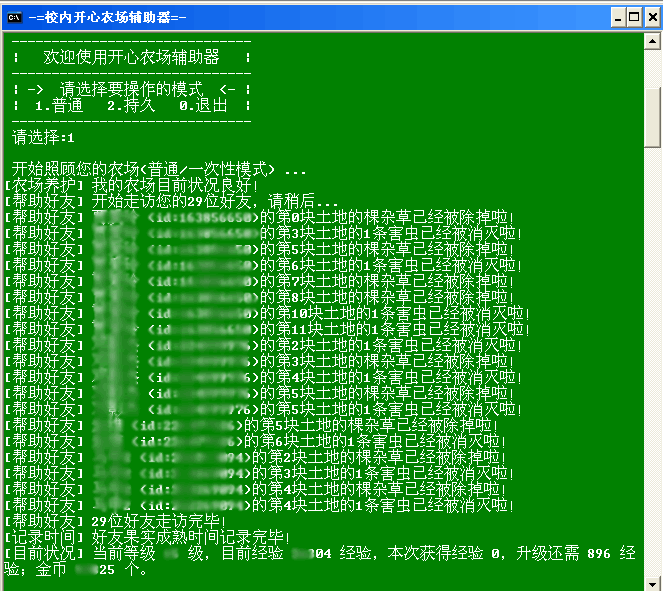
Except for automatically selling fruits in your warehouse (after all, selling them yourself is where the sense of achievement comes from!), every other function is fully supported. First, I’ll explain how to use it to give you a hands-on feel. That way, you’ll have the curiosity and motivation to dive into the deeper theoretical side of it!~
Before you begin, please download the PHP Runtime Library, and then download the source code: happyfarm [Download Currently Suspended] (Version: v0.6 alpha | Update: 2009-04-02 | MD5: 812a81ef79d61befc026316583e77758 | Changelog: Adapted to the new Happy Farm update, changed several API URLs, and optimized the entire pipeline).
Extract the program into the program directory of the PHP runtime library so that the happyfarm directory is on the same level as the bin directory. Next, configure the parameters in myinfo.ini and friend.ini (just like we did for Parking Wars). The config files have inline comments. (Remember to open them with WordPad/EditPlus, not Notepad, otherwise it’ll mess up the encoding. Bear uses EditPlus, which is a super handy, widely used editor). Once configured, you are ready to roll!
Sounds simple enough, right? In reality, many people might get stuck on the configuration step. Haha, don’t worry, let Bear show you how. Class is in session!~
In myinfo.ini, you should be able to configure everything quickly except for ownerid (your Happy Farm ID). So, how do you get your Happy Farm ID?
First, log into Xiaonei, open the Happy Farm app, right-click anywhere, and choose “View Page Source.” This is the raw source code of the Xiaonei Happy Farm homepage. Search for a23163_app.xn_data=. You will find a string of numbers right after xn_user:. That is your ownerid (Happy Farm ID).
Don’t rush just yet—do you know what that code actually is? That is the legendary JavaScript! If you’re interested, you can examine it; this JS data will be utilized inside the Happy Farm Flash application.
Awesome, phase one is complete! Now you can put your ID into the configuration file and launch the bot using happyfarm.bat. (PS: There’s nothing magical about this .bat file; it simply invokes the PHP interpreter from the bin folder to run the PHP script. Please make absolutely sure that your happyfarm directory is on the same level as the bin directory, otherwise it won’t be able to locate the PHP runtime files.)
Next up is configuring your friends’ details, otherwise how are you going to sneak in and steal their crops?
First, you need to download Firefox. What? You don’t have it yet? How can you call yourself a web developer without it? It’s an indispensable browser for any web programmer!
Once you have it, install the Firebug extension. If you haven’t used it before, just search for it online—it’s super straightforward. Now, open Xiaonei in Firefox, log in, navigate to Happy Farm, open Firebug, and start capturing network packets (if you’re curious about packet analysis, you might want to read a basic networking tutorial).
To cut to the chase: expand your friends sidebar in the game. It’s best to clear Firebug’s network log first, then click on any friend’s avatar. You will see a POST request sent to http://happyfarm.fivminutes.com/api.php?mod=user&act=run&flag=1&new=1&farmKey=..... or similar. Click on the captured request to view the POST payload, and you’ll see ownerId=xxxxxx. That xxxxxx is the unique UID of the friend you just clicked!
Go ahead and add this to friend.ini in the format: xxxxxx = Friend Name (one entry per line). Some might ask: why not just write a script to auto-fetch your own UID and your friends’ UIDs? Well, doing that isn’t hard, but where would the fun and educational value be in that? Remember, we are here to learn!~
Once everything is set up, anyone who loves coding can open happyfarm.php with a proper editor (not Notepad!). See the “Game Parameters Configuration” section? You can tweak the values there to personalize the bot’s behavior to your liking.
Over time, those with a background in C can start experimenting and modifying the codebase. Bear’s coding style isn’t the cleanest, so please bear with me (I wrote most of this on the sly during work hours, focusing strictly on speed!). In short: the more you dig into this, the more knowledge you’ll uncover to apply to your own projects.
Alright, let’s wrap it up here for now. If you have any questions, feel free to reach out. I would love to hear your feedback, critiques, and suggestions!